<?php

    // ini_set('display_errors', '1');
    // ini_set('display_startup_errors', '1');
    // error_reporting(E_ALL);

    error_reporting(E_ALL ^ E_NOTICE);

    require_once(__DIR__."/php/federation-service/config.php");
    require_once(__DIR__."/php/federation-service/services/api-service.php");
    require_once(__DIR__."/php/federation-service/services/card-service.php");
    require_once(__DIR__."/php/federation-service/services/peer-map-service.php");

    $apiService = new ApiService(Config::FEDERATION_ENDPOINT);
    $cardService = new CardService();
    $peerMapService = new PeerMapService();

    $peers = $apiService->getPeers();
    $cards = $cardService->getCards($peers);
    $peerMaps = $peerMapService->getPeerMaps($peers);
?>

<!doctype html>
<html lang="en">

<head>
    <meta charset="utf-8">
    <meta http-equiv="X-UA-Compatible" content="IE=edge">
    <title>EarthServer</title>
    <meta name="description" content="EarthServer Datacube Federation">
    <meta property="og:title" content="EarthServer" />
    <meta property="og:description" content="EarthServer Datacube Federation" />
    <meta name="viewport" content="width=device-width, initial-scale=1.0">

    <meta name="websites" content=" http://earthserver.org https://earthserver.org http://www.earthserver.org https://www.earthserver.org "/>

    <link href="css/general.css" rel="stylesheet" type="text/css">
    <link href="css/demo.css" rel="stylesheet" type="text/css">

    <link href="js/libs/leaflet-1.6.0/leaflet.css" rel="stylesheet" type="text/css">
    <link href="js/libs/leaflet-markercluster-1.4.1/MarkerCluster.css" rel="stylesheet" type="text/css">
    <link href="js/libs/leaflet-markercluster-1.4.1/MarkerCluster.Default.css" rel="stylesheet" type="text/css">
    <link href="js/libs/killer-carousel-1.10.0/killercarousel.css" rel="stylesheet" type="text/css">

    <link rel="icon" href="img/favicon.ico">

    <script src="js/prescript.js"></script>
    <script src="js/vendor/modernizr.js"></script>

    <link href="css/general.css" rel="preload" as="style">
    <link href="css/demo.css" rel="preload" as="style">
    <link href="js/vendor/plugins.js" rel="preload" as="script">
    <link href="js/core.js" rel="preload" as="script">
    <link href="js/vendor/noty.js" rel="preload" as="script">
    <link href="js/gallery.js" rel="preload" as="script">
    <link href="js/menu.js" rel="preload" as="script">
    <link href="js/app.js" rel="preload" as="script">
    <script src="js/jquery.js"></script>
    <script src="js/vendor/plugins.js"></script>
    <script src="js/libs/leaflet-1.6.0/leaflet.js"></script>
    <script src="js/libs/leaflet-markercluster-1.4.1/leaflet.markercluster-src.js"></script>
    <script src="js/libs/killer-carousel-1.10.0/killercarousel.js"></script>

    <meta name="theme-color" content="#0074D9">

    <script>

        $( document ).ready(function() {

            function escapeHTML(s){ return s
              .replace(/&/g,"&amp;").replace(/</g,"&lt;")
              .replace(/>/g,"&gt;").replace(/"/g,"&quot;").replace(/'/g,"&#39;"); }

            function allowHttpUrl(u){
              try { const url = new URL(u, location.origin);
                    return (url.protocol === "http:" || url.protocol === "https:") ? url.href : "#"; }
              catch { return "#"; }
            }

            // Render the list of peers on the Leaflet map
            function renderMap(mapDivId) {

              <?php
                    echo "let peerMaps = " . json_encode(
                        $peerMaps,
                        JSON_HEX_TAG | JSON_HEX_AMP | JSON_HEX_APOS | JSON_HEX_QUOT
                    ) . ";";
                ?>

                // lat, long
                let divMap = L.map(mapDivId).setView([48.0900, 20.3467], 2);

                // base map
                L.tileLayer('https://tile.openstreetmap.org/{z}/{x}/{y}.png?{foo}',
                {foo: 'bar', attribution: '&copy; <a href="https://www.openstreetmap.org/copyright">OpenStreetMap</a> contributors'}).addTo(divMap);

                let markers = L.markerClusterGroup({
                    spiderfyOnMaxZoom: false,
                    showCoverageOnHover: false
                });

                peerMaps.forEach(peerMap => {

                    const name = escapeHTML(peerMap.fullName || "");
                    const desc = escapeHTML(peerMap.description || "");
                    const href = allowHttpUrl(peerMap.url || "");
                    const logo = allowHttpUrl(peerMap.logo || "");

                    let html = `<div><img src='img/marker-icon.png' class="map-marker-icon"/>${name}</div>`;

                    let peerIcon = L.divIcon({
                        html: html,
                        className: "map-marker-text",

                        iconSize:     [120, 30],
                        iconAnchor:   [0, 0], // point of the icon which will correspond to marker's location
                        popupAnchor:  [0, 0] // point from which the popup should open relative to the iconAnchor
                    });

                    let obj = JSON.parse(peerMap.geoCoordinates);
                    let lat = obj.Latitude;
                    let lon = obj.Longitude;

                    var popUpText = `<a href="${href}"><div class="map-logo-popup" style='background-image: url("${logo}"); aspect-ratio:1'></div></a>
                                     <h3><a href="${href}">${name}</a></h3>
                                     ${desc} <br/><br/>`;

                    // a marker (lat, lon)
                    let textMarker = L.marker([lat, lon], {icon: peerIcon})
                                .bindPopup(popUpText);
                    markers.addLayer(textMarker);
                })

                divMap.addLayer(markers);

            }

            renderMap("peersMap");
        });

    </script>

</head>


<body id="body" class="body">

    <!-- [main wrapper (animsition)] -->

    <div id="animsition" class="animsition">

        <!-- [menu] -->

        <div class="menu">
            <nav class="navbar navbar-fixed-top navbar-transparent-inverse">
                <div class="container">
                    <div class="navbar-header">
                        <button type="button" class="navbar-toggle" data-toggle="collapse" data-target=".navbar-collapse">
                            <span class="button-icon-default">&#9776;</span>
                        </button>
                        <div class="logo-wrapper">
                            <a href="index.php">
                                <img src="img/logo.png" alt="EarthServer" class="style-logo" />
                            </a>
                        </div>
                    </div>
                    <nav class="navbar-collapse collapse style-navbar">
                        <ul class="nav navbar-nav smooth-scrollto-menu">
                            <li>
                                <a href="index.php" data-scroll>Home</a>
                            </li>
                            <li>
                                <a href="index.php#about" data-scroll>About</a>
                            </li>
                            <li>
                                <a href="index.php#enter" data-scroll>Enter!</a>
                            </li>
                            <li>
                                <a href="index.php#join" data-scroll>Join!</a>
                            </li>
                            <li>
                                <a href="events/index.html" data-scroll>Events</a>
                            </li>
                            <li>
                                <a href="index.php#terms" data-scroll>Terms</a>
                            </li>
                        </ul>
                    </nav>
                </div>
            </nav>
        </div>

        <!-- begin main content -->

        <div class="style-heading-center-top" style="height:40vh">
            <div class="logo text-logo">
                <h1 class="style-heading-text">
                    EarthServer: <br/> &nbsp; &nbsp; The Federated Datacube Space
                </h1>
                <br>
                <span class="style-heading-secondline">
                    Understand. Space. Time.
                </span>
            </div>
        </div>
        <div style="background: url(img/bg.jpg) no-repeat; background-size: 100%; height: 85vh; width: 100%;" data-parallax="scroll" data-speed="0.6"> </div>

        <div class="container">
            <div class="pages margin-small index-list">
                <br/>
                <div class="media">
                    <h2 class="style-fancy-heading text-center">
                        <i class="icon-styled fa fa-cube"></i>Analysis-Ready? Datacubes!
                    </h2>
                    <p>
                        Datacubes are an accepted cornerstone for analysis-ready data -
                        homogenization of zillions of scenes into a few space-time cubes with unified spatial and temporal access
                        has been shown to lead to both simpler and more scalable services.
                        However, the range of service quality is immense, from "write your own python code" to high-level, coding-free analytics.
                        The <a href="tech/datacube-manifesto/The-Datacube-Manifesto.pdf">Datacube Manifesto</a>
                        establishes basics and best practices on flexible, function-rich, open, and interoperable datacube services.
                    </p>
                </div>
                <br/>

                <div class="media">
                    <h2 class="style-fancy-heading text-center">
                        <i class="icon-styled fa fa-book"></i>Huh? Datacubes? Standards??
                    </h2>
                    <a href="wcs/"><img src="img/moving-cube.gif" style="float: left; padding-right: 20px" height="100px"></a>
                    <p>
                        <b>Don't worry - coverage standards are not drama queens!</b>
                        Learn more about the <a href="webinars/">OGC datacube standards</a> which enable access, analytics,
                        and fusion on this single, multi-Petabyte information space spanning the planet.
                        See the <a href="wcs/">EarthServer webinars</a> for an easy-to-digest introduction to the datacube standards, from zero to hero.
                        More practical tips can be found in the <a href="https://doc.rasdaman.org/11_cheatsheets.html">rasdaman cheatsheets</a>
                        and <a href="http://tutorial.rasdaman.org/">tutorials</a>.
                    </p>
                </div>
                <br/>

                <div class="media">
                    <h2 class="style-fancy-heading text-center">
                        <i class="icon-styled fa fa-cubes"></i>Try &amp; Explore!
                    </h2>
                    <a href="https://demo.earthserver.eu"><img src="img/earth-datacube-playground.png" style="float: right; padding-left: 20px" height="120px"></a>
                    <p>
                        <b>From 1-D through 4-D</b>, from access over visualization to fusion - you name it!
                        The <a href="https://demo.earthserver.eu">EarthServer Datacube Sandbox</a>,
                        done by <a href="https://l-sis.org">Constructor University</a>,
                        illustrates the power of standards-based datacubes
                        in a wide spectrum of client contexts: from simple map navigation with Leaflet over virtual globes to Web GIS and high-end analytics.
                    </p>
                </div>
                <br/>
            </div>
        </div>

        <a name="about" id="about"></a>
        <div class="pages-demo-bg style-heading-background-small" data-parallax="scroll" data-speed="0.6">
        </div>

        <div class="container">
            <div class="pages margin-small index-list">
                <br/>
                <h2 class="style-fancy-heading text-center">
                    About EarthServer
                </h2>

                <h3 class="text-center"><i class="icon-styled fa fa-globe"></i>Planetary-Scale Earth Datacube Federation</h3>
                <p>
                    The EarthServer federation provides a uniform data space of spatio-temporal Earth data,
                    integrating a massive number of large-scale data providers in a completely location transparent manner.
                    The European Copernicus Sentinel archives plus many more data assets are readily available for mix &amp; match.
                </p>
                <p>
                    All data provided by federation members are accessible on any node, with no difference for the user.
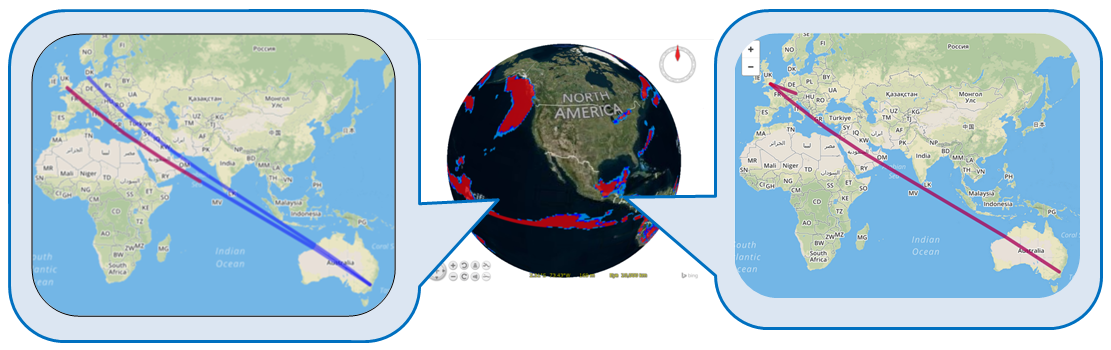
                    The example below shows a query done between ECMWF, located in the UK, and the Australian National Computational Infrastructure (NCI).
                </p>
                <p class="center">
                    <img src="img/federation-example.png" style="width: 100%;">
                </p>
                <h3 class="text-center"><i class="icon-styled fa fa-balance-scale"></i>Governance</h3>
                <p>
                    EarthServer is an open community of large-scale Earth data providers, including research centers, supercomputing centers, companies, agencies. All
                    EarthServer members contribute jointly to the single common information space for multi-dimensional spatio-temporal Earth data which EarthServer
                    offers as a single point of Earth data and services.
                </p>
                <p>
                    Currently, the EarthServer Charter is being established for discussion and, upon agreement, adoption by the EarthServer community. Goal is to retain
                    full autonomy of every participant while providing a fair, open, usable contribution valuable to the EarthServer users.
                </p>

                <h3 class="text-center">How it all emerged: <i class="icon-styled fa fa-play-circle-o"></i><a href="img/earthserver.jpg">watch the video</a> !
                    <br/>
                    <a href="https://youtu.be/N53H4GJEMoA"><img src="img/earthserver.jpg" style="width: 300px"></a>
                </h3>

                <h3 class="text-center">Visitors since 2025-06-03
                    <br/>
                    <a href="https://info.flagcounter.com/zMsf"><img src="https://s01.flagcounter.com/map/zMsf/size_s/txt_000000/border_CCCCCC/pageviews_0/viewers_0/flags_0/" alt="Visitors" border="0"></a>
                </h3>

            </div>
        </div>

        <a name="enter" id="enter"></a>
        <div class="pages-demo-bg style-heading-background-small" data-parallax="scroll" data-speed="0.6">
        </div>

        <br/>
        <div class="jumbotron text-center container" style="background-image:url(img/partners/service-access-bg.png);background-size:cover;resize:both;">
          <div class="jumbotron-actual">
            <h2 class="display-4 m-b">Datacubes At Your Fingertips</h2>
            <p class="lead-alt m-b-md">The combined federation data asset is available in full through any of the members below, such as this one, operated by Constructor University: </p>
            <!-- <a href="https://datacubes.eecs.jacobs-university.de" class="button button-theme button-large hvr-icon-fade button-rounded text-uppercase"><span>Enter the Federation</span></a> -->

            <a href="https://copernicube.eu/rasdaman-dashboard" class="button button-theme button-large hvr-icon-fade button-rounded text-uppercase"><span>Enter the Federation</span></a>

          </div>
        </div>

        <a name="members" id="members"></a>
        <div class="pages-demo-bg style-heading-background-small" data-parallax="scroll" data-speed="0.6">
        </div>

        <div class="container">
            <h2 class="style-fancy-heading text-center">EarthServer Federation Members</h2>
            <h3 class="content text-center">in alphabetical order</h3>

            <!-- Main wrapping parent. -->
            <div style="height:320px; background-image:url(img/fed-grid-background.jpg); ">

                <!-- Main wrapping parent. -->
                <div class="kc-wrap" style="margin-left: 40px;">
                    <?php
                        foreach($cards as $card):
                    ?>

                    <?php
                      $url  = filter_var($card->url, FILTER_VALIDATE_URL) ? $card->url : '#';
                      $logo = filter_var($card->logo, FILTER_VALIDATE_URL) ? $card->logo : '';
                      $name = htmlspecialchars($card->fullName ?? '', ENT_QUOTES, 'UTF-8');
                    ?>
                    <div class="kc-item wow partner-card">
                        <a href="<?= htmlspecialchars($card->url, ENT_QUOTES, 'UTF-8') ?>">
                          <h4 class="title"><?= $name ?></h4>
                          <img src="<?= htmlspecialchars($logo, ENT_QUOTES, 'UTF-8') ?>" class="card-img" alt="">
                        </a>
                    </div>

                    <?php endforeach; ?>

                </div>
            </div>

<!--
            <div class="container-cards" id="container-cards">

                <?php
                    foreach($cards as $card):
                ?>
                <a href="<?= $card->url ?>">
                    <div class="card wow fadeInLeft partner-card" data-wow-delay="1.0s">
                        <h3 class="title"><?= $card->fullName ?></h3>
                        <img src="<?= $card->logo ?>" class="card-img" >
                    </div>
                </a>

                <?php endforeach; ?>

            </div>

-->

        </div>

        <br/>
        <div class="map">
            <div class="container">
                <h3 class="content text-center">by geographic location</h3>
                <div class="row" width="100%">
                    <div class="map-canvas-wrapper">
                        <div id="peersMap" class="map-canvas"></div>
                    </div>
                </div>
            </div>
        </div>

        <a name="join" id="join"></a>
        <div class="pages-demo-bg style-heading-background-small" data-parallax="scroll" data-speed="0.6">
        </div>

        <div class="container">
            <div class="pages margin-small index-list wow">
                <h2 class="style-fancy-heading text-center">Have Data to Share?<br/><i class="icon-styled fa fa-handshake-o"></i>  <br/> Join the Federation!</h2>
                <p>
                    You have spatio-temporal Earth data to offer? Join us - the EarthServer federation is open and free!
                    Once your datacube service is configured you just approach the federation board which will undertake all steps in a completely transparent process.
                    <a href="mailto:earthserver@rasdaman.com">Contact us</a> anytime to find out more.
                </p>
            </div>
        </div>

        <a name="terms" id="terms"></a>
        <div class="pages-demo-bg style-heading-background-small" data-parallax="scroll" data-speed="0.6">
        </div>

        <div class="container">
            <div class="pages margin-small index-list wow">
                <h2 class="style-fancy-heading text-center">Terms of Reference</h2>
                <h3 class="text-center">Responsible Maintainer</h3>

                <br>
                <table align="center" style="background:#eeeeee"><tr><td style="padding:20px">
                    Constructor University <br>
                    Campus Ring 1 <br>
                    28759 Bremen
                </td></tr></table>
                <br>

                <p align="center">
                    <b>Contact: </b>
                    Peter Baumann,
                    <script language="javascript">
                        function compose(t1,t2,t3)
                        {
                            document.write( "<a href=\"mailto:" + t1 + "@" + t2 + "." + t3 + "\">" );
                            document.write( t1 + "@" + t2 + "." + t3 );
                            document.write( "</a>" );
                        }
                        compose( "pbaumann", "constructor", "university" );
                    </script>
                    <noscript>
                        (allow Javascript for mail address)
                    </noscript>
                </p>

                <h3 class="text-center">External Links</h3>
                <p>
                    All external links implemented on this site have been checked for conformance with the spirit and
                    intent
                    of this site, and have found conformant at this time. However, the maintainer of this site has no
                    control over the (change of) contents of the referred websites and, therefore, does not assume any
                    responsibility for the contents of referred websites.
                </p>

                <h3 class="text-center">German Data Protection Regulation (GDPR)</h3>
                <p>
                    The controller responsible for the described data collection and processing is
                    <a href="https://www.constructor.university">Constructor University</a>.
                    Our EarthServer data protection officer, <a href="mailto:earthserver@rasdaman.com">Peter Baumann</a>,
                    will be happy to provide you with information or suggestions on the topic of data protection.
                </p>
                <p>
                    When you visit our website, the Web server temporarily stores usage information on our server
                    machine (running in Germany) for statistical purposes in the form of a log in order
                    to improve the quality of our website and to fulfill funding agency statistics reporting
                    obligations.
                </p>
                <p>
                    We do not transfer your personal data to third parties without your express consent. We use
                    <a href="https://flagcounter.com">flagcounter</a> for determining the country of visitors
                    which obviously is in accordance with GDPR.
                </p>
                <p>
                    When it comes to processing your personal data, the GDPR grants you certain rights as a website
                    user:
                </p>
                <ul>
                    <li class="bul">Right of Access (Art. 15 of the GDPR): You have the right to request
                        confirmation as to whether personal data concerning you is being processed; where this is
                        the case, you have a right of access to this personal data and to the information specified
                        in Article 15 of the GDPR.
                    <li class="bul">Right to Rectification and Right to Erasure (Art. 16 and 17 of the GDPR): You
                        have the right to immediately request the rectification of incorrect personal data concerning
                        you and, if necessary, the completion of incomplete personal data. You also have the right
                        to request that personal data concerning you be erased immediately if one of the reasons
                        listed in Art. 17 of the GDPR applies in detail, e.g. if the data is no longer required
                        for the purposes for which it was collected.
                    <li class="bul">Right to Restriction of Processing (Art. 18 of the GDPR): You have the right to
                        request a restriction of processing for the duration of a review if any of the conditions
                        specified in Art. 18 of the GDPR have been met, e.g. if you have lodged an objection to the
                        processing.
                    <li class="bul">Right to Data Portability (Art. 20 of the GDPR): In certain cases (which are
                        outlined in detail in Article 20 of the GDPR), you have the right to obtain from us your
                        personal data in a structured, standard, machine-readable format or to request the transfer of
                        such data to a third party.
                    <li class="bul">Right to Object (Art. 21 of the GDPR): If data is collected on the basis of Art.
                        6(1)(f) of the GDPR (data processing on the grounds of legitimate interests), you have the
                        right to object to the processing at any time for reasons arising from your particular
                        situation. If you make such an objection, we will no longer process your personal data unless
                        we can demonstrate compelling legitimate grounds for the processing which override your
                        interests, rights, and freedoms or for the establishment, exercise, or defense of legal claims.
                    <li class="bul">Right to Lodge a Complaint with a Supervisory Authorityr: In accordance with Art. 77
                        of the GDPR, you have the right to lodge a complaint with a supervisory authority if you
                        believe that the processing of your personal data violates data protection regulations. This
                        right to lodge a complaint may particularly be exercised before a supervisory authority
                        in the EU member state where you reside, work, or where you suspect that your rights
                        have been infringed.
                </ul>
            </div>
        </div>

        <!-- end main content -->

    </div>

    <!-- END OF [main wrapper (animsition)] -->
    <div class="copyright p-t p-b">
        <div class="container">
            <p class="copyright-text text-center copyright-footer">
                Copyright &copy; <?= date("Y"); ?>  &nbsp;
                <a href="http://www.constructor.university/">Constructor University</a> &nbsp; &amp; &nbsp;
                <a href="http://www.rasdaman.com/">rasdaman GmbH</a>
            </p>
        </div>
    </div>


</body>

<script src="js/core.js"></script>

<script>

$(function() {
    var index = Math.round(Math.random() * <?= count($cards) ?>);
    $('.kc-wrap').KillerCarousel({
        perspectiveOrigin: "50% 0px",
        infiniteLoop: true,
        frontItemIndex: index,
        // Width of carousel.
        width: 900,
        // Item spacing in 3D (modern browsers) modes.
        spacing3d: 120,
        showReflection: false
    });
});

</script>


</html>